

Remote browser isolation (RBI) opens a risky website somewhere other than the laptop. The user still sees the page and can click. The site's code never runs on the device. You need it when a secure web gateway (SWG: cloud filtering of internet traffic) cannot safely allow the site, and blocking it would stop work. Isolation is the middle path: the page stays usable, and the laptop does not execute the site's code.
The choice is how you buy it. Isolation can be a dedicated product, or a policy on a Secure Service Edge (SSE: cloud security for web traffic, SaaS apps, and private apps) you already run. The other split is the browser: users keep Chrome or Edge, or they take a replacement enterprise browser. Replacement browsers are a different purchase. They are not on this list. Rendering differs too. Some vendors show the remote page as a stream of images or draw commands. Others run a copy of the page in the cloud, then the local browser displays sanitized HTML.
If isolation is the product and people keep the browser they have, start with Menlo. If internet traffic already goes through Cloudflare One, Zscaler Internet Access, Netskope, or Prisma Access, isolation is usually a policy on that path, not a second console. Isolation as a policy on SSE sits next to our enterprise SSE tools list. The method is on How we review tools.
What usually goes wrong when choosing remote browser isolation
Most bad fits start with treating an isolate checkbox as a dedicated isolation product.
| Problem | Solution |
|---|---|
| Isolation is an SSE checkbox, not the product | Write whether isolation is the product you are buying or an action inside SSE |
| Rendering is not named | Ask how the remote page is shown on the user's device |
| A bundle price hides the isolation line | Use a public isolation price, or treat it as quote-only |
| You cannot keep the browser you have | Ask whether users stay on the browser they already run |
How we evaluated remote browser isolation
Four checks: whether isolation is a dedicated product or an action inside SSE, whether the vendor names how the remote page is shown, whether any price is public, and what that published number actually covers. Zero-latency claims did not decide the list. Neighbor products sit under Other remote browser isolation platforms worth considering.
TL;DR: The 6 Compared
| Platform | Best for | What to check |
|---|---|---|
| Menlo Security | Clientless isolation as the product, on the browser people already use |
ProductDedicated RBI. Cloud twin, sanitized HTML. No replacement browser
BrowserKeep Chrome, Edge, Safari. MARS (5 Aug 2026) sanitizes what Copilot and Claude Code read
PriceQuote-only. AWS listing from $130 / 12 months for 0–99 users. Most enterprises take a private offer
|
| Cloudflare Browser Isolation | Teams already on Cloudflare One who want isolation as a policy |
ProductRBI add-on on Zero Trust Pay-as-you-go and Enterprise. Not on Free
BrowserKeep the local tab. Draw commands plus Canvas Remoting (GA 10 Apr 2026)
PricePay-as-you-go $7 / user / month annual is Gateway and Access. Isolation add-on is quote
|
| Zscaler Cloud Browser Isolation | An isolate policy on ZIA, plus a later path to an enterprise browser |
ProductClientless isolation under Zero Trust Browser
BrowserClientless now. Extension and Chromium enterprise browser shipped 10 Jun 2026
PriceAWS from $15,750 / 50 users / 12 months. Most enterprises take a private offer. Isolation is a separate quote
|
| Netskope Remote Browser Isolation | Isolate as a Netskope web and data action, not a second console |
ProductTargeted RBI versus Extended RBI on top of SWG or SSE
BrowserKeep the local browser. Client hybrid from NewEdge
PriceAWS SWG from $64,363 per 100 users / 12 months. RBI itself is quote
|
| Proofpoint Isolation | Email-threat shops that isolate URL clicks instead of blocking them |
ProductIsolation. Isolation versus Prime is an order-form question
BrowserKeep the browser. Clientless
PriceQuote-only
|
| Prisma Access Remote Browser Isolation | Prisma Access estates that want isolation on the SWG they already run |
ProductSSE add-on license. Not Prisma Browser
BrowserKeep the browser you have
PriceQuote-only. Not in base Prisma Access
|
Menlo Security
Menlo Security is isolation as the product. A hardened digital twin of the user's browser runs in the Menlo Cloud. Adaptive Clientless Rendering (ACR) sends sanitized HTML back to Chrome, Edge, Safari, or whatever is already installed. No replacement browser. No agent.
Twin-browser updates land within 72 hours, faster if critical. On 5 Aug 2026 Menlo extended Menlo Agent Runtime Security (MARS) to Microsoft Copilot, Gemini in Chrome, Claude Code, and Claude Cowork: strip hidden instructions out of the pages and files an agent reads, then block exfil. On 12 Aug IGEL paired its endpoint OS with Menlo Secure Application Access so browser-first workflows do not need a VDI farm. Synapxe, Singapore's national healthtech agency, left Broadcom RBI after apps broke, then help-desk calls about browsing stopped after Menlo.
Best for: Enterprises that want clientless isolation on the browser people already use.
What you get:
- ACR / DOM mirroring: active code runs in the cloud; the local browser displays sanitized HTML.
- Works with any local browser, including AI-powered ones.
- MARS (5 Aug 2026) sanitizes what Copilot, Gemini, and Claude Code read.
- Secure Application Access for internal apps over the same isolation path, now with an IGEL pairing.
Why we like it: It is the only product here whose first job is isolation itself, not a policy inside a larger SSE platform. If you want web code off the laptop and users still on Chrome or Edge, start here.
Limits:
- You are buying a specialist. SWG, a cloud access security broker (CASB: controls on files and activity in SaaS), and zero trust network access (ZTNA: replacing VPN access to private apps) live elsewhere unless you also take Menlo's broader platform.
- Site exceptions still happen. Isolation-first does not mean every SPA renders on the first try.
- The public AWS price is a procurement listing. Budget a private offer.
Price: Quote-only. A public AWS listing starts at $130 / 12 months for 0–99 users. Most enterprises take a private offer. Ask whether MARS is on the quote.
Cloudflare Browser Isolation
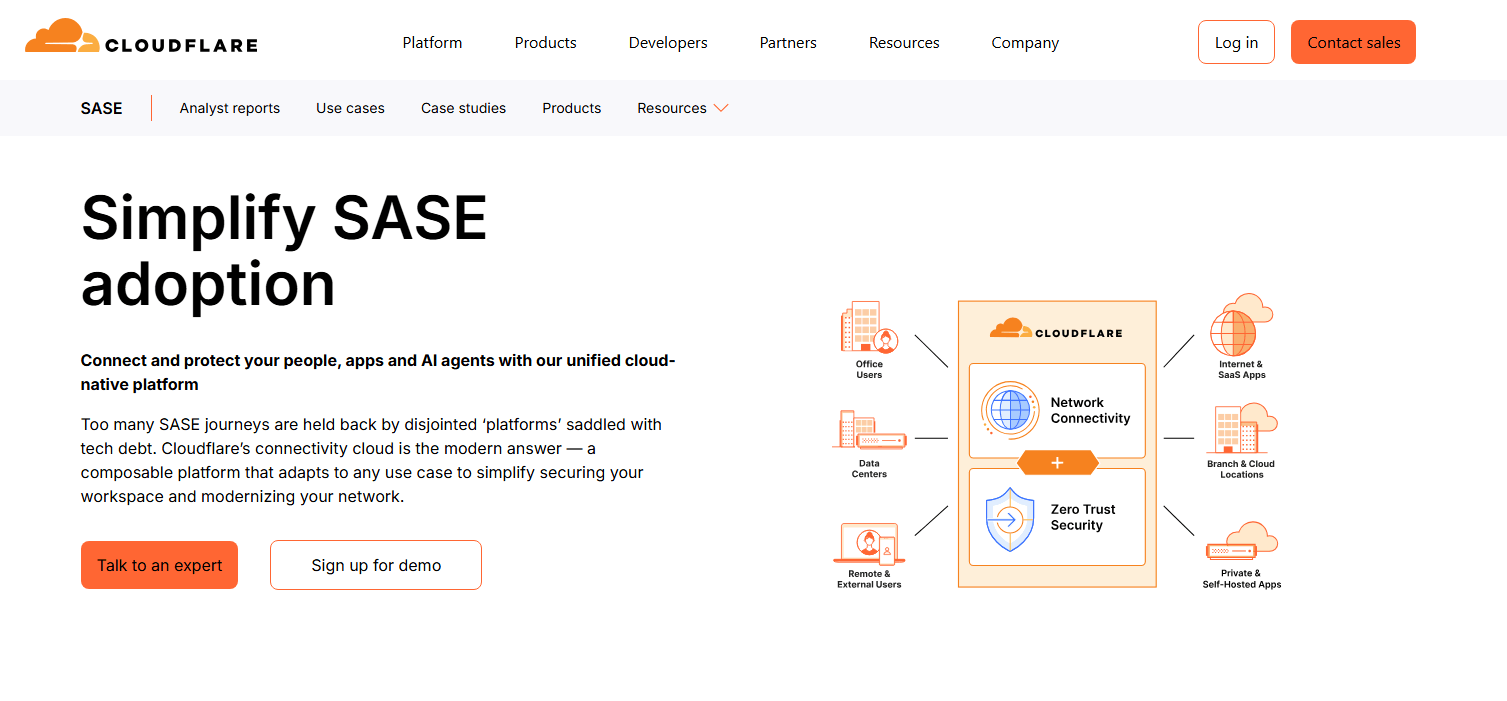
Cloudflare Browser Isolation is the isolate action inside Cloudflare One. Active content (JavaScript, plugins) runs in a remote browser on Cloudflare's edge. The local tab looks like Chrome. Close it and the session is deleted.
The transport is Network Vector Rendering (NVR): draw commands instead of a video of the page. On 10 Apr 2026 Canvas Remoting extended that to HTML5 Canvas, on by default. Office-in-browser uses about 90 percent less bandwidth than bitmap streaming. Google Sheets holds 30 fps. WebGL and 3D stay on bitmaps. On 7 Jul 2026 Isolate policies started working on Gateway authorization proxy endpoints, so PAC-file traffic can take identity-based isolate rules without the Cloudflare One client. Isolation is an add-on on Zero Trust Pay-as-you-go and Enterprise. The free plan does not include it.
Best for: Teams already on Cloudflare One who want isolation as a policy.
What you get:
- NVR plus Canvas Remoting (GA 10 Apr 2026) for Canvas-heavy SaaS.
- Identity-based Isolate on authorization proxy endpoints since 7 Jul 2026.
- Every tab isolated when the policy hits; session dies on close.
- Same Gateway HTTP and DNS policies you already write for block / allow.
Why we like it: If you already run Cloudflare Access and Gateway, isolation is a policy on that same stack. You can put a published Zero Trust seat in the budget before you quote the isolation add-on, and Canvas-heavy SaaS has been covered since April 2026.
Limits:
- RBI is an add-on. Pay-as-you-go is Gateway and Access.
- CASB and full DLP (data loss prevention) are thinner than Netskope. If the isolate reason is data leaving personal Drive, demo DLP.
- Pay-as-you-go log retention is short. Export to a SIEM before the first incident.
Price: Cloudflare Zero Trust Pay-as-you-go is $7 / user / month (annual) for Gateway and Access. A free plan exists for a first proof. Browser Isolation is an add-on on Pay-as-you-go and Enterprise; the add-on itself is quote. Log Explorer: first 10 GB free, then $1 / GB / month.
Zscaler Cloud Browser Isolation
Zscaler Cloud Browser Isolation sits under Zero Trust Browser: three form factors, one policy plane. Cloud Browser Isolation (CBI) is the clientless one. High-risk sites, unmanaged devices, VDI you want to stop paying for. The other two, shipped at Zenith Live on 10 Jun 2026, are a browser extension and a Chromium enterprise browser. Those two add Browser Detection and Response (malicious extensions, OAuth token theft) that cloud isolation cannot see.
Turbo Mode splits rendering so the local GPU handles GLSL work instead of streaming every frame. Isolation traffic on the Advanced edition starts at 1.5 GB per user per month and can be lifted to unlimited. That traffic allowance is how a "we isolated everything" rollout gets expensive.
Best for: Zscaler Internet Access shops that want isolate as a policy, then a browser path.
What you get:
- Clientless Cloud Browser Isolation for risky destinations and unmanaged devices.
- Extension and Enterprise Browser (10 Jun 2026) for in-browser BDR and local DLP.
- Turbo Mode GPU offload for the isolated session.
- Optional isolation for private and SaaS apps (separate add-on) when VDI is the thing you are replacing.
Why we like it: If internet traffic already goes through Zscaler Internet Access, adding isolation is a policy on that path. The three form factors are the honest part: clientless isolation, an extension, and a replacement browser are three different purchases, so you can start clientless and add the others later.
Limits:
- CBI is an add-on or a higher edition. Isolation traffic starts at 1.5 GB per user per month unless you buy unlimited.
- Admin order and policy learning curve show up in every public review set. Budget time as well as seats.
- Portal log retention without a SIEM export is a recurring complaint. Export on day one.
Price: Published edition blocks start at $15,750 for 50 users / 12 months. Most enterprises take a private offer. Cloud Browser Isolation Advanced, and isolation for private or SaaS apps, are separate quotes. Ask whether isolation traffic is the 1.5 GB Advanced allowance or unlimited.
Netskope Remote Browser Isolation
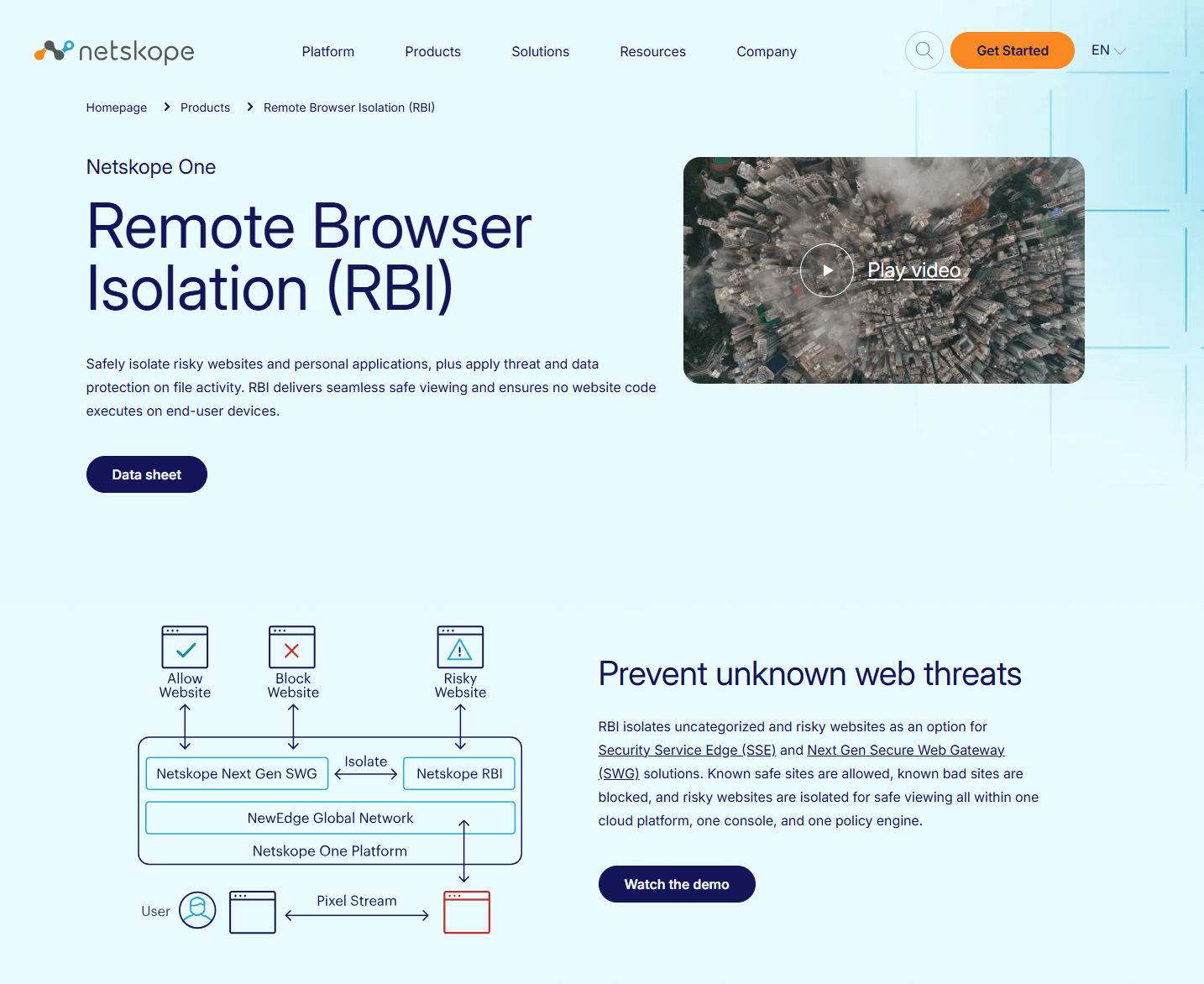
Netskope One RBI is an isolate action on the same policy engine as Next Gen SWG and SSE. Known-good is allowed, known-bad is blocked, uncategorized and risky are isolated. File activity in the isolated session inherits the DLP and threat products you already licensed. Read-only mode kills typing, clipboard, and print when the page is a credential trap.
Two options. Targeted RBI covers uncategorized and security-risk categories. Extended RBI adds any predefined or custom category, application suites, Cloud Confidence Level, tags, and destination country. PDFs render in flight and arrive as a safe stream; scripts in the file never hit the endpoint. Rendering is client hybrid, delivered from NewEdge: 120-plus data centers in 80-plus regions, including mainland China, with a full stack in every location.
Best for: Netskope shops that isolate uncategorized sites and personal webmail in one console.
What you get:
- Isolate as a SWG/SSE action. Targeted vs Extended options.
- DLP and threat inspection on isolated uploads and downloads; read-only and clipboard controls.
- In-flight PDF viewer that strips embedded scripts.
- Same NewEdge path and latency SLAs as the rest of Netskope One.
Why we like it: If your team already writes web and data policies in Netskope, isolation is one more action in that language, including DLP on files in the isolated session. You are not standing up a second isolation console.
Limits:
- RBI rides Netskope SSE. Without that stack, the isolate action has nothing to attach to.
- Extended RBI is the option that isolates personal Gmail and custom apps. Targeted will not get you there. Read the quote line.
- Agent and TLS edge cases still show up in public admin threads. Pilot Google Workspace and the identity provider before you isolate the long tail.
Price: RBI is licensed on top of SWG or SSE. The published SWG line starts at $64,363 per 100 users / 12 months. RBI itself is quote. Most enterprises take a private offer. Ask Targeted versus Extended on that quote.
Proofpoint Isolation
Proofpoint Isolation is cloud remote isolation for risky URLs and personal webmail. The page renders in a disposable remote container. Active content and JavaScript do not execute on the endpoint. Close the session and it is destroyed. Users keep the browser they already have. No replacement Chromium, and no requirement to rip out the proxy, SWG, or firewall already in place.
Targeted Attack Protection (TAP), Proofpoint's email threat product, can isolate email URL clicks by user or URL risk instead of blocking them, and write those sessions into the TAP dashboard. Policies can block upload, download, paste, and form input. Attachments re-render to HTML5. Isolation versus Collaboration Security Prime is an order-form question. Isolation still covers browser, email, and TAP URL isolation.
Best for: Proofpoint TAP shops that isolate email URLs and personal webmail.
What you get:
- Cloud isolation for risky and uncategorized URLs and personal webmail, with sessions destroyed after use.
- TAP click isolation for email URLs, logged in the TAP dashboard.
- Policy controls on upload, download, paste, and form input; attachments re-rendered to HTML5.
- Clientless isolation that works with the proxy, SWG, or firewall you already have.
Why we like it: If you already isolate email URL clicks in TAP, this is isolation for those clicks and for personal webmail, without standing up a separate SSE platform. The other products here start from a web gateway or a dedicated isolation cloud. This one starts from the email click.
Limits:
- Isolation versus Prime is an order-form question. Name which one is on the 2026 quote.
- Adaptive email isolation wants TAP. This is not a full SSE client.
- No public list price. Budget a quote, and name Isolation versus Prime on that quote.
Price: Quote-only. Ask Isolation versus Prime on the order form.
Prisma Access Remote Browser Isolation
Prisma Access Remote Browser Isolation is the isolation add-on on Prisma Access. Browse execution moves off the endpoint into Prisma Access, which streams a near-native view of the page. Users keep the browser they already have. You need Prisma Access 5.0 Innovation, a Mobile User or Remote Networks subscription, and a separate Remote Browser Isolation license. Isolation is not included in base Prisma Access.
Isolation profiles attach to existing Prisma Access security rules, including URL categories. Profiles can disable copy/paste, keyboard, upload, download, and print. Isolated traffic still hits the Prisma threat stack you already license (Advanced Threat Prevention, WildFire, URL Filtering, DNS Security, SaaS Security). Onboarding is GlobalProtect, Explicit Proxy, or Remote Networks. There is no extra RBI login. Health, usage, and license sit in the same Strata Cloud Manager or Panorama pane. Unmanaged-device browsing is Prisma Browser, a different product. Isolation and a replacement browser are not the same purchase.
Best for: Prisma Access estates that want isolation on the SWG they already run.
What you get:
- RBI add-on on Prisma Access 5.0 Innovation, with a Mobile User or Remote Networks subscription plus a separate isolation license.
- Isolation profiles on existing security rules, including copy/paste, keyboard, upload, download, and print controls.
- Isolated traffic still inspected by the Prisma threat services already on the path.
- Same GlobalProtect, Explicit Proxy, or Remote Networks onboarding. No extra isolation login.
Why we like it: If you already run Prisma Access, isolation is a policy profile on rules you already have, not a second console and not a replacement browser. The other SSE options here also isolate as a policy. This one stays in the Prisma objects and threat stack the network team already operates.
Limits:
- Not included in base Prisma Access. Minimum Prisma Access 5.0 Innovation, plus the separate RBI license.
- Prisma Browser is a different product. If the proof is a contractor laptop without GlobalProtect, you may be looking at the replacement browser, not this add-on.
- No public isolation-seat price. Budget a quote.
Price: Quote-only. Separate RBI license on Prisma Access. Not Prisma Browser.
Isolation as a policy on SSE is one path. The broader platform comparison is our enterprise SSE tools list.
Is isolation a dedicated product, and do users keep their current browser?
This grid plots two questions. Across: is isolation a dedicated product (left) or an add-on on a broader security platform (right)? Up: do users keep Chrome or Edge (top), or is the vendor also selling an extension or a replacement browser (bottom)?

 Isolate as a policy
Placement is isolation as the product versus an isolate action on SSE, and clientless-on-existing-browser versus a published extension or enterprise-browser form factor. Zscaler still sells clientless CBI; it sits on the replacement-browser path because Zero Trust Browser now names three form factors. Placement only, not review scores.
How pricing works
| Platform | Published rate | What the line leaves out |
|---|---|---|
| Menlo Security | AWS from $130 / 12 months, 0–99 users. Otherwise quote-only | Whether MARS is on the quote. Larger deploys are a private offer |
| Cloudflare Browser Isolation | Zero Trust Pay-as-you-go $7 / user / month annual | The Isolation add-on dollar. $7 is Gateway and Access. Log Explorer after 10 GB is $1 / GB / month |
| Zscaler Cloud Browser Isolation | AWS from $15,750 / 50 users / 12 months. Private offer is typical | CBI Advanced and private/SaaS isolation. Isolation traffic from 1.5 GB / user / month unless unlimited |
| Netskope Remote Browser Isolation | AWS SWG from $64,363 per 100 users / 12 months | RBI itself. Targeted versus Extended |
| Proofpoint Isolation | Quote-only. Ask Isolation vs Prime | TAP is the email-click path |
| Prisma Access Remote Browser Isolation | Quote-only. Separate RBI license | Prisma Browser is not this add-on |
Other remote browser isolation platforms worth considering
These products sit next to remote browser isolation. They are not this comparison: a named isolation product you can still buy, a public price you can attach to isolation, or a job that is still remote isolation of the browser you already have.
- FortiIsolator - End of life. FortiIsolator 3.0 is retired. Existing VMs only. Not a 2026 new purchase.
- Island, Prisma Access Browser, Talon - Replacement enterprise browsers. They replace the browser itself, which is a different product than isolating sites in Chrome or Edge. If that is the job, it is a different page.
Questions before you isolate a category
If a quote cannot answer these three, you are still looking at a demo.
- Are we isolating because the SWG cannot decide, or because we want a dedicated isolation product? Uncategorized and newly registered domains are an SSE policy. Keeping all web code off unmanaged devices is a dedicated isolation product.
- What breaks first? Office-in-browser, internal SPAs, and anything that needs WebGL. Ask for Canvas / DOM / Turbo Mode in the POC, and keep a written exception path. Isolating the entire web is how help desks fill up.
- What does the published number actually buy? A Gateway-and-Access seat, an edition block, or an SWG line is not the isolate add-on. Put the isolate line on the quote before the pilot looks cheap.
Which remote browser isolation platform should you pick
Clientless isolation as the product: Menlo. Uncategorized long tail on an SSE you already run: Cloudflare ($7 is Gateway and Access; Isolation is quote), Zscaler, or Netskope. Proofpoint TAP shop: Isolation, and ask Isolation versus Prime on the order form. Already on Prisma Access: the RBI add-on, not Prisma Browser. A replacement browser is a different purchase. For the broader SSE platforms that often carry isolation as a policy, see Best Enterprise SSE Tools in 2026.
Frequently asked questions
Is Cloudflare's public Pay-as-you-go seat the price of Browser Isolation?
No. That seat is Gateway and Access. Browser Isolation is an add-on on Pay-as-you-go and Enterprise. The add-on price is not listed. Ask for the Isolation line before you treat the public seat as the isolate price.
Does the Menlo AWS listing include MARS?
The public AWS listing is a small-user starting line. It does not say whether Agent Runtime Security is inside that line. Ask whether MARS is on the quote.
Should we isolate every website?
No. Start with uncategorized, newly registered, and personal webmail. Isolating the entire web is how help desks fill up. Office-in-browser, internal SPAs, and WebGL are the first things that break. Keep a written exception path.